


“You’re my blue sky, you’re my sunny☀️ day.”
Happy Labor Day👷👷🏽♀️ Weekend!
Back at the end of July, we decided to re-route course and go back to the basics with AWS Cloud☁️ focusing on the core concepts and principals of the AWS. Despite hitting a temporary obstacle, we subsequently took and passed the AWS Certified Cloud Practitioner certification exam📝 last week. Feeling the need to spread the love❤️ around the Troposphere we decided we should circle 🔵 back to Microsoft’s very popular cloud☁️ offering Azure and focus on the “fundies” or Fundamentals of Azure. Of course, this wasn’t our first time 🕰 at this rodeo🤠🐴. We spent several occasions in the Microsoft Stratosphere☁️☁️ before. The most recent was looking at Microsoft’s NoSQL Azure offerings. This time 🕰 we would concentrate specifically on General Cloud☁️ Concepts, Azure Architectural Components, Microsoft Azure Core Services, Security🔒, Privacy🤫, Compliance, and Pricing💰, Service Level Agreements, and Lifecycles. To obtain such knowledge we would need to explore several resources starting with our first course 🍽 of Azure fundamentals which was an amazing compilation of rich documentation, vignettes🎞 from current and former blue badgers/ Cloud☁️ Advocates Anthony Bortolo, Sonia Cuff, Phoummala Schmitt, Susan Hinton, Rick Claus, Christina Warren, Pierre Roman and Scott Cate and several short labs🧪 that give you free access to the Azure Cloud☁️ and let you implement solutions. For our second course 🍽 we went out to YouTube and found 5 ½ hours ⏳ of goodness 😊 with Paul Browning’s awesome videos on “Microsoft Azure Fundamentals (AZ 900) – Complete Course” and then for encore we went to Pluralsight and visited with both Michael Brown and his Microsoft Azure Security🔒 and Privacy🤫 Concepts and with Steve Buchanan and his Microsoft Azure Pricing and Support Options because who can ever get enough of Security🔒 and Pricing💰?
“So, I look in the sky, but I look in vain…Heavy cloud☁️, but no rain🌧”
General Cloud☁️ Concepts
First, let’s review… What is cloud☁️ computing anyway? There are numerous meanings out there. According to Wikipedia “Cloud☁️ computing is the on-demand availability of computer system resources, especially data storage🗄 (cloud☁️ storage🗄) and computing power🔌, without direct active management by the user. “
It’s really just a catchy name. So, despite contrary to belief Cloud☁️ Computing has nothing to do with the clouds☁️ ☁️ or the weather☔️ in the sky. In simplest terms it means sharing of pooled computing resources over the Internet. And are you ready for the catcher? “that you can rent”. In other words, you pay for what you use. Opposed to traditional computing way where a company or organization would invest in potentially expensive real estate to house owned Compute🖥, Storage🗄, Networking or fancy Analytics.
So now we are faced with the argument Capital expenditure (traditional computing cost model) versus operational expenditure (Cloud☁️ Computing cost model)
Capital expenditure (CapEx) 💰consists of the funds that a company uses to purchase major physical goods or services that the company will use for more than one year and the value will depreciate over time 🕰
Operational expenditure (OpEx) 💰are deducted in the same year they’re made, allowing you to deduct those from your revenues faster.
So, looking from a cost perspective, the cloud☁️ can offer a better solution for a better cost since the cloud☁️ provider’s already has those, so you would benefit from the economies of scale⚖️.
That’s great but let’s leave the expenses to the bean counters. After all we are technologists and we want the best performance and efficient technology solutions. So, what other benefits does Cloud☁️ provide me? How about Scalability ⚖️, Elasticity 🧘♀️, Agility 💃, Fault Tolerance, High Availability, Disaster🌪 Recovery and Security🔒.
- Scalability ⚖️: Cloud☁️ will increase or decrease resources and services used based on the demand or workload at any given time 🕰. Cloud☁️ supports both vertical ⬆️ and horizontal ↔️ scaling ⚖️ depending on your needs.
- Elasticity 🧘♀️: Cloud☁️ compensate spike 📈 or drop 📉 in demand by automatically adding or removing resources.
- Agility 💃: Cloud☁️ eliminates the burdens of maintaining software patches, hardware setup, upgrades, and other IT management tasks. All of this is automatically done for you. Allowing you to focus on what matters: building and deploying applications.
- Fault Tolerance: Cloud☁️ has fully redundant datacenters located in various regions all over the globe.
- High Availability & Disaster Recovery: Cloud☁️ can replicate your services into multiple regions for redundancy and locality or select a specific region to ensure you meet data-residency and compliance laws for your customers.
- Security🔒: Cloud☁️ offers a broad set of policies, technologies, controls, and expert technical skills that can provide better security🔒 than most organizations can otherwise achieve.
Ok, now I am sold. But what types of clouds☁️ are there?
There are multiple types of cloud☁️ computing services, but the three main ones are:
Infrastructure as a service (IaaS) – enables applications to run🏃🏻on the cloud☁️ instead of using their own infrastructures. Allows the most control over provided hardware that runs 🏃 your applications
Platform as a Service (PaaS)- enables developers to create as software without investing in expensive 🤑 hardware. Allows you to create an application quickly without managing the underlying infrastructure.
Software as a Service (SaaS) – provides answers to desktop needs for end users. Based on an architecture where one version of the application is used for all customers and licensed through a monthly or annual subscription.
What about Cloud☁️ Deployment models? Well, there are multiple types of cloud☁️ deployment models out there as well.
Public cloud☁️: cloud☁️ vendor that provides cloud☁️ services to multiple clients. All of the clients securely 🔒 share the same hardware in the back end.
Private cloud☁️: organization uses their own hardware and software resources to achieve cloud☁️ services.
Hybrid cloud☁️: this cloud☁️ model is a combination of both private and public cloud☁️ models.
Community cloud☁️: this model consists of a pool of computer resources. These resources are available to the different organizations with common needs. Clients or tenants can access the resources quickly and securely🔒. Clients are referred to as tenants.
“Blue skies, smilin’ 😊 at me Nothin’ but blues skies do I see”
So now that we expounded the virtues of Cloud☁️ computing Concepts let’s take a deeper a look on what we came for…
Microsoft Azure is a cloud☁️ computing service created by Microsoft for building, testing, deploying, and managing applications and services through a global network of Microsoft managed data centers.
“Architecture starts when you carefully put two bricks🧱 together. There it begins.”
Azure Architectural Components
Microsoft Azure is made up of data centers located around the globe 🌎. These data centers are organized and made available to end users by region. A region is a geographical 🌎 area on the planet 🌎 containing at least one, but potentially multiple data centers that are in close proximity and networked together with a low-latency network.
Azure divides the world 🌎 into geographies 🌎 that are defined by geopolitical boundaries or country borders. An Azure geography is a discrete market typically containing two or more regions that preserves data residency and compliance boundaries.
Availability sets are a way for you to ensure your application remains online if a high-impact maintenance event is required, or if a hardware failure occurs. Availability sets are made up of Update domains (UD) and Fault domains (FD).

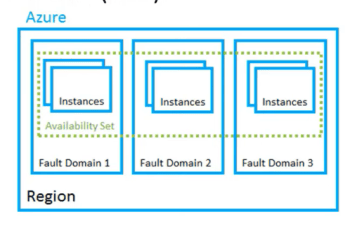


Fault domains is a logical group of underlying hardware that share a common power🔌 source and network switch, similar to a rack within an on-premise data center.
Update domains is a logical group of underlying hardware that can undergo maintenance or be rebooted at the same time 🕰. An update domain is a group of VMs that are set for planned maintenance events at the same time 🕰.
Paired regions support redundancy across two predefined geographic 🌎 regions, ensuring that even if an outage affects an entire Azure region, your solution is still available.
Additional advantages of regional pairs:
- In the event of a wider Azure outage, one region is prioritized out of every pair to help reduce the time 🕰 to restore for applications.
- Planned Azure updates are rolled out to paired regions one at a time 🕰 to minimize downtime 🕰 and risk of application outage.
- Data continues to reside within the same geography as its pair (except for Brazil South) for tax and law enforcement jurisdiction purposes.
Availability Zones are physically separate locations within an Azure region that use availability sets to provide additional fault tolerance.
Resource group is a unit of management for your resources in Azure. A resource group is like container that allows you to aggregate and manage all the resources required for your application in a single manageable unit.
Azure Resource Manager is a management layer in which resource groups and all the resources within it are created, configured, managed, and deleted.
“It is our choices, Harry, that show what we truly are, far more than our abilities.”― J.K. Rowling
Azure Services


Azure provides over 100 services that enable you to do everything from running 🏃 your existing applications on virtual machines to exploring 🔦new software paradigms such as intelligent bots and mixed reality. Below are some of the services available in Azure:
Azure compute 🖥 – is an on-demand computing service for running cloud-based ☁️ applications.
There are four common techniques for performing compute 🖥 in Azure:
- Virtual machines – software emulations of physical computers 🖥 .
- Containers – virtualization environment for running 🏃 applications.
- Azure App Service – (PaaS) offering in Azure that is designed to host enterprise-grade web-oriented applications
- Serverless computing – cloud☁️ hosted execution environment that runs 🏃 your code but completely abstracts the underlying hosting environment.
Azure Virtual Machines (VMs) (IaaS) lets you create and use virtual machines in the cloud☁️.
Scaling VMs in Azure
Availability sets is a logical grouping of two or more VMs that help keep your application available during planned or unplanned maintenance 🧹.
- Up to three fault domains that each have a server rack with dedicated power🔌 and network resources
- Five logical update domains which then can be increased to a maximum of 20
Azure Virtual Machine Scale⚖️ Sets let you create and manage a group of identical, load balanced VMs.
Azure Batch enables large-scale⚖️ job scheduling and compute 🖥 management with the ability to scale⚖️ to tens, hundreds, or thousands of VMs.
- Starts a pool of compute 🖥 VMs for you
- Installs applications and staging data
- Runs 🏃jobs with as many tasks as you have
- Identifies failures
- Re-queues work
- Scales ⚖️ down the pool as work completes
Containers in Azure
Azure supports Docker🐳 containers (a standardized container model), and there are several ways to manage containers in Azure.
- Azure Container Instances (ACI)
- Azure Kubernetes Service (AKS)☸️
- Azure Container Instances (ACI) offers the fastest and simplest way to run🏃🏻 a container in Azure.
- Azure Kubernetes Service (AKS)☸️ is a complete orchestration service for containers with distributed architectures with multiple containers.
Containers are often used to create solutions using a microservice architecture. This architecture is where you break solutions into smaller, independent pieces.
Azure App Service
Azure App Service (PaaS) enables you to build and host web apps, background jobs, mobile📱backends, and RESTful 😴 APIs in the programming language of your choice without managing infrastructure. It offers automatic scaling ⚖️ and high availability.
App Service, you can host most common app service styles, including:
- Web apps- includes full support for hosting web apps using ASP.NET, ASP.NET Core, Java☕️ , Ruby 💎, Node.js, PHP, or Python 🐍 .
- API apps – build REST-based 😴 Web 🕸APIs using your choice of language and framework
- Web Jobs – allows you to run🏃🏻 a program (.exe, Java☕️ , PHP, Python 🐍 , or Node.js) or script (.cmd, .bat, PowerShell⚡️🐚, or Bash🥊) in the same context as a web 🕸 app, API app, or mobile 📱 app. They can be scheduled or run🏃🏻 by a trigger 🔫.
- Mobile📱app back-ends – quickly build a backend for iOS and Android apps.
Azure Networking
Azure Virtual Network enables many types of Azure resources such as Azure VMs to securely🔒 communicate with each other, the internet, and on-premises networks. Virtual networks can be segmented into one or more subnets. Subnets help you organize and secure🔒 your resources in discrete sections.
Azure Load Balancer is a load balancer service that Microsoft provides that helps take care of the maintenance for you. Load Balancer supports inbound and outbound scenarios, provides low latency and high throughput ↔️, and scales⚖️ up to millions of flows for all Transmission Control Protocol (TCP) and User Datagram Protocol (UDP) applications. Azure Application Gateway
VPN gateway is a specific type of virtual network gateway that is used to send encrypted traffic🚦 between an Azure Virtual Network and an on-premises location over the public internet. It provides a more secure 🔒 connection from on-premises to Azure over the internet.
Application Gateway is a load balancer designed for web applications. It uses Azure Load Balancer at the transport level (TCP) and applies sophisticated URL-based routing rules to support several advanced scenarios.
Here are some of the benefits of using Azure Application Gateway over a simple load balancer:
- Cookie 🍪 affinity.
- SSL termination
- Web 🕸 application firewall🔥 (WAF)
- URL rule-based routes.
- Rewrite HTTP headers
Content delivery network (CDN) is a distributed network of servers that can efficiently deliver web 🕸 content to users. It is a way to get content to users in their local region to minimize latency.
Azure Storage🗄 is a service that you can use to store files📁, messages✉️, tables , and other types of information.
Disk storage🗄 provides disks for virtual machines, applications, and other services to access and use as they need, similar to how they would in on-premises scenarios. Disk storage🗄 allows data to be persistently stored and accessed from an attached virtual hard disk.
Azure Blob storage🗄 is object storage🗄 solution for the cloud☁️. Blob storage🗄 is optimized for storing massive amounts of unstructured data, such as text or binary data.
Blob storage🗄 is ideal for:
- Serving images or documents directly to a browser.
- Storing files for distributed access.
- Streaming video 📽 and audio 📻.
- Storing data for backup and restore, disaster recovery, and archiving.
- Storing data for analysis by an on-premises or Azure-hosted service.
Azure Files Storage🗄 enables you to set up highly available network file shares that can be accessed by using the standard Server Message Block (SMB) protocol. That means that multiple VMs can share the same files with both read and write access. You can also read the files using the REST 😴 interface or the storage🗄 client libraries 📚
File shares can be used for many common scenarios:
- Many on-premises applications use file shares.
- Configuration files 📂 can be stored on a file share and accessed from multiple VMs.
- Diagnostic logs, metrics, and crash dumps are just three examples of data that can be written to a file 📂 share and processed or analyzed later.
Azure Archive Blob Storage🗄
Azure Archive Blob storage🗄 is designed to provide organizations with a low cost means of delivering durable, highly available, secure cloud☁️ storage🗄 for rarely accessed data with flexible latency requirements. Azure storage🗄 offers different access tiers include:
- Hot 🥵 – Optimized for storing data that is accessed frequently.
- Cool 🥶 – Optimized for storing data that is infrequently accessed and stored for at least 30 days.
- Archive 🗃 – Optimized for storing data that is rarely accessed and stored for at least 180 days with flexible latency requirements (on the order of hours).
Storage🗄 Replication
Azure regions and geographies🌎 become important when you consider the available storage🗄 replication options. Depending on the storage🗄 type, you have different replication options.
- Locally redundant storage🗄 (LRS)- Replicates your data 3x within the region in which you create your storage🗄 account.
- Zone redundant storage🗄 (ZRS) – Replicates your data 3x across two to three facilities, either within a single region or across two regions.
- Geo-redundant storage🗄 (GRS) – Replicates your data to secondary region that is hundreds of miles away from the primary region.
- Read-access Geo-Redundant storage🗄 (RA-GRS)- Replicates your data to a secondary region, as with GRS, but also then provides read only access to the data in the secondary location.
Azure Database🛢 services are fully managed PaaS database🛢 services. Enterprise-grade performance with built-in high availability, scales⚖️ quickly and reach global 🌎 distribution.
Azure Cosmos DB 🪐is a globally 🌎distributed database🛢 service that enables you to elastically and independently scale⚖️ throughput and storage🗄 across any number of Azure’s geographic 🌎 regions. It supports schema-less data that lets you build highly responsive and Always On applications to support constantly changing data.
Azure SQL Database🛢 is a relational database🛢 as a service (DBaaS) based on the latest stable version of Microsoft SQL Server database🛢 engine. SQL Database🛢 is a high-performance, reliable, fully managed and secure database🛢 without needing to manage infrastructure. SQL database🛢 offers 4 service tiers to support lightweight to heavyweight 🏋️♀️ database🛢 loads:
- Basic
- Standard
- Premium
- Premium RS
Azure Database🛢 for MySQL is a relational database🛢 service powered by the MySQL community edition. It’s a fully managed database🛢 as a service offering that can handle mission-critical workloads with predictable performance and dynamic Scalability ⚖️.
Azure Database🛢 for PostgreSQL is a relational database🛢 service based on the open-source Postgres database🛢 engine. It’s a fully managed database-as-a-service offering that can handle mission-critical workloads with predictable performance, security🔒, high availability, and dynamic Scalability ⚖️.
Azure Database🛢 Migration Service is a fully managed service designed to enable seamless migrations from multiple database🛢 sources to Azure data platforms with minimal downtime 🕰 (online migrations).
Dynamic Scalability ⚖️ enables your database🛢 to transparently respond to rapidly changing resource requirements and enables you to only pay for the resources that you need when you need them.
Elastic pools to maximize resource utilization
Elastic pools are designed dial performance up or down on demand especially if usage patterns are relatively predictable.
Azure Marketplace
Azure Marketplace is a service on Azure that helps connect end users with Microsoft partners, independent software vendors (ISVs), and start-ups that are offering their solutions and services, which are optimized to run🏃🏻on Azure. The solution catalog spans several industry categories:
- Open-source container platforms
- Virtual machine images
- Databases🛢
- Application build and deployment software
- Developer tools🛠
- Threat detection 🛡
- Blockchain🔗
Internet of Things (IoT) 📲is the ability for devices to garner and then relay information for data analysis. There are many services that can assist and drive end-to-end solutions for IoT on Azure. Two of the core Azure IoT service types are:
- IoT 📲 Central is a fully managed global IoT software as a service (SaaS) solution that makes it easy to connect, monitor, and manage your IoT assets at scale⚖️.
- IoT 📲 Hub is a managed service hosted in the cloud☁️ that acts as a central message hub for bi-directional communication between your IoT application and the devices it manages. You can use Azure IoT Hub to build IoT solutions with reliable and secure communications between millions of IoT devices and a cloud☁️-hosted solution backend.
- IoT📲 Edge is the technology from Microsoft for building Internet of Things (IoT) solutions that utilize Edge Compute. IoT Edge extends IoT Hub. Analyze device data locally instead of in the cloud to send less data to the cloud☁️, react to events quickly, and operate offline.
Big data and analytics – Data comes in all types of forms and formats. When we talk about big data, we’re referring to large volumes of data.
Azure Synapse Analytics is a limitless analytics service that brings together enterprise data warehousing and big data analytics.
Azure HDInsight is a fully managed, open-source analytics service for enterprises. It is a cloud☁️ service that makes it easier, faster, and more cost-effective to process massive amounts of data. HDInsight supports open-source frameworks and create cluster types:
- Apache Spark ⭐️
- Apache Hadoop 🐘
- Apache Kafka
- Apache HBase
- Apache Storm🌧
- Machine Learning Services
Microsoft Azure Databricks🧱 provides data science and data engineering teams with a fast, easy and collaborative Spark-based platform on Azure. It gives Azure users a single platform for Big Data processing and Machine Learning.
Artificial Intelligence (AI) 🧠is the creation of software that imitates human behaviors and capabilities. Key🔑 elements include:
- Machine learning – This is often the foundation for an AI system, and is the way we “teach” a computer in model to make prediction and draw conclusions from data.
- Anomaly detection – The capability to automatically detect errors or unusual activity in a system.
- Computer vision👓 – The capability of software to interpret the world visually through cameras, video, and images.
- Natural language processing – The capability for a computer to interpret written or spoken language and respond in kind.
- Conversational AI – The capability of a software “agent” to participate in a conversation.
Azure Machine Learning service is a cloud-based☁️ platform for creating, managing, and publishing machine learning models. Azure Machine Learning provides the following features and capabilities:
- Automated machine learning
- Azure Machine Learning designer
- Data and compute🖥 management
- Pipelines
Azure Machine Learning studio is a web 🕸 portal for data scientist developers in Azure Machine Learning. The studio combines no-code and code-first experiences for an inclusive data science platform.
Serverless computing lets you run🏃🏻 application code without creating, configuring, or maintaining a server. Azure has two implementations of serverless compute🖥:
- Azure Functions, which can execute code in almost any modern language.
- Azure Logic Apps, which are designed in a web-based designer and can execute logic triggered by Azure services without writing any code.
Azure Event Grid allows you to easily build applications with event-based architectures. Event Grid has built-in support for events coming from Azure services, like storage🗄 blobs and resource groups.
“DevOps brings together people, processes, and technology, automating software delivery to provide continuous value to your users.”
Azure DevOps Services allows you to create build and release pipelines that provide CI/CD (continuous integration, delivery, and deployment) for your applications.
- Azure DevOps – (SaaS) platform from Microsoft that provides an end-to -end DevOps toolchain⛓ for developing and deploying software. It also integrates with most leading tools🛠 on the market and is a great option for orchestrating a DevOps toolchain⛓.
- Azure DevTest Labs🧪 – (PaaS) enables developers on teams to efficiently self-manage virtual machines (VMs. DevTest Labs🧪 creates labs 🧪 consisting of pre-configured bases or Azure Resource Manager templates.
Azure management options
You can configure and manage Azure using a broad range of tools🛠 and platforms. Tools🛠 that are commonly used for day-to-day management and interaction include:
- Azure portal for interacting with Azure via a Graphical User Interface (GUI)
- Azure PowerShell⚡️🐚 cross-platform version of PowerShell⚡️🐚 that enables you to connect to your Azure subscription and manage resources.
- Azure Command-Line Interface (CLI) cross-platform command-line program that connects to Azure and executes administrative commands
- Azure Cloud☁️ Shell 🐚 interactive, authenticated, browser-accessible shell🐚 for managing Azure resources.
- Azure mobile 📱 app access, manage, and monitor 🎛 all your Azure accounts and resources from your iOS 📱 or Android phone or tablet.
- Azure SDKs for a range of languages and frameworks, and REST 😴 APIs manage and control Azure resources programmatically.
Azure Advisor is a free service built into Azure that provides recommendations on high availability, security🔒, performance, operational excellence, and cost. Advisor analyzes your deployed services and looks for ways to improve your environment across each of these areas.
“Don’t worry about a thing Cause every little thing gonna be alright”
Security🔒, Privacy🤫, Compliance
Azure Advisor Security🔒 Assistance.
- Azure Advisor Security🔒 Assistance integrates with Security🔒 Center.
- Provide best practice security🔒 recommendations.
- Azure Advisor Security🔒 Assistance helps prevent, detect, and respond to security🔒 threats.
- You or your team should be using this tool every day to get the latest security🔒 recommendations.
- Configuration of this tool 🔧, the amount of information it is gathering, the type of information it is gathering, is controlled through Security🔒 Center.
Securing Azure Virtual Networks
Network Security🔒 Groups (NSGs) – filter traffic🚦.
- NSG has an inbound list and an outbound list.
- Attached to subnets or network cards
- Each NSG could be linked to multiple resources
- NSG are stateful.
Application Security🔒 Groups – allow us to reference a group of resources
- Used as even a source or destination of traffic🚦.
- They do not replace network security🔒 groups.
- Enhance them network security🔒 groups are still required.
When working with application security🔒 groups,
- create the application security🔒 group
- link the application security🔒 group to a resource
- use the application security🔒 group when working with network security🔒 groups.
Azure Firewall🔥 is a stateful firewall🔥 service and highly available solution provided by Azure. It’s a virtual appliance configured at the virtual network level. It protects access to your virtual networks. Features of Azure Firewall🔥 include:
- Threat intelligence. 🧠
- It supports both outbound and inbound NATing
- Integrates with Azure Monitor 🎛
- Network traffic🚦filtering rules
- Unlimited in scale⚖️
Azure DDos protection provides DDoS mitigation for networks and applications.
Always on as a service.
- Provides protection all the way up to the application layer.
- Integrates Azure Monitor 🎛 for reporting services.
- Features offered by Azure DDoS protection include:
- Multi‑layered support, so protection from layer 4 attacks up to layer 7 attacks.
- Attack analytics. So, we can get reports on attacks in progress, as well as post attack reports
- Scale⚖️ and elasticity
- Provides protection against unplanned costs💰.
Azure DDoS comes in two different service tiers, basic and standard.
Azure Web Application Firewall🔥 is designed to publish your applications to the outside world 🌎 , whether they’re in Azure or on‑premises, and lures bound traffic🚦 towards them.
Forced tunneling allows the control of flow of internet‑bound traffic🚦.
Security🔒 Scenarios
- Control Internet traffic🚦 – User defined routes, Azure FW 🔥 or marketplace device
- Azure hosted SQL Server – NSGs
- VPN – Forced tunneling
Azure identity services
Identity services will help us in the authentication 🔐and authorization👮🏽♂️ of our users. Authentication works hand in hand with authorization.
Authentication🔐 – The act of proving who or what something is
Authorization 👮🏽♂️ – Granting the correct level of access to a resource or service
In Azure, authentication🔐 is provided by Azure AD and authorization is provided by role‑based access control.
Azure Active Directory is a cloud-based identity service used in Azure. It used to authenticate and authorize users. When we think Azure Active Directory, think single sign on. Azure Active Directory is not to be equivalent of Active Directory Domain Services used on-premise.
Active Directory Domains Services – full Active Directory Domain Service that we’ve used for years on‑premise.


Azure AD Domain Services (PaaS)- introduced to make it easier to migrate legacy applications as it supports both NTLM and Kerberos for authentication🔐. also supports Group Policies, trust🤝 relationships, as well as several over domain service features.
Azure AD Connect as being like a synchronization tool.
Multi‑factor authentication involves providing several pieces of information to prove who you are. Microsoft strongly recommends that we use multi‑factor authentication.
Azure Security🔒 Center reports our complying status against certain standards.
It provides continuous assessment of existing and new services that we deploy, it also provides threat protection for both infrastructure and Platform as a Service services.
Azure Key 🔑 Vault is a service we can use to protect our secrets. Azure Key 🔑 Vault uses hardware security🔒 modules. These hardware security🔒 modules have been validated to support the latest Federal Information Processing Standards.
Azure Information Protection (AIP) to classify documents 📃 and emails 📧. AIP applies Labels to documents 📃. Labeled documents 📃 can be protected. There are two sides to Azure Information Protection
These classifications come in the form of metadata that can be attached with a header or added as watermarks to the document you’re trying to protect. Once classified, then the documents can be protected.
Classification of Documents. 📃
Azure uses Azure Rights Management to encrypt the documents using Rights Managements templates.
Azure Advanced Threat Protection 🛡 (Azure ATP) is a cloud☁️-based security🔒 solution that identifies, detects, and helps you investigate advanced threats, compromised identities, and malicious insider actions directed at your organization. Azure ATP 🛡 portal allows you to create your Azure ATP 🛡 instance, and view the data received from Azure ATP🛡 sensors.
Azure ATP 🛡sensors are installed directly on your domain controllers. The sensor monitors domain controller traffic🚦 without requiring a dedicated server or configuring port mirroring.
Azure ATP cloud☁️ service runs on Azure infrastructure and is currently deployed in the United States, Europe, and Asia. Azure ATP cloud☁️ service is connected to Microsoft’s intelligent security🔒 graph.
Azure Policy is a collection of rules. Each policy we create is assigned to a scope, such as an Azure subscription. When using Azure Policy, we create a policy definition, a policy assignment, and policy parameters,
When we create Azure policies, they can be used by themselves or they can be used with initiatives. Initiatives are a collection of policies. To use initiatives, we create an initiative definition, an initiative assignment, and initiative parameters
Role Based Access Control (RBAC) is used daily by your organization. It’s central to access control in Azure. Azure provides shared access. RBAC is made up of several different components
- Roles are groups of permissions that are needed to perform different administrative actions in Azure. We then assign role members before configuring a scope for the role.
- Scope details where a role can be used. There are many built‑in roles, each giving different sets of permissions, but three built‑in roles are used more than any other.
Three used most often roles are:
- Owner role full control of that resource, including the ability to assign other users and group access.
- Contributor role allows you to do everything except manage permissions.
- Reader📖 role. This role is read‑only
Always follow the principle of least privilege.
Locks🔒 – prevent deletions or editing of resource groups and their content Two types Locks 🔒 are Read‑only and Delete.
If you make a resource group read‑only, then all the resources in there can be accessed, but no new resources can be added to the resource group or removed from the resource group.
Delete, then no resources can be deleted from the resource group, but new resources can be added.
Azure Blueprints – advanced way of orchestrating the deployment of resource templates and artifacts.
- Blueprints maintain a relationship between themselves and the resources that they deployed.
- Blueprints include Azure policy and initiatives as well as artifacts such as roles.
To use Blueprints, we require a Blueprint definition, we Publish the Blueprint, and then Assign it to a scope.
Blueprint definition
- Resource groups can be defined and created
- Azure policy can be included to enforce compliance
- Azure resource manager templates can be included to deploy resources
Roles can be assigned to resources that blueprints have created
Azure Monitor to collect and analyze metric information both on premise and in Azure
Azure Service Health that we can use to see the health status of the Azure services
- Personalized dashboards
- Configurable alerts🔔
- Guidance and Support
Service Trust🤝 Portal (STP) hosts the Compliance Manager service and is the Microsoft public site for publishing audit reports and other compliance-related information relevant to Microsoft’s cloud☁️ services.
- ISO
- SOC
- NIST
- FedRAMP
- GDPR
Microsoft Privacy🤫 Statement explains what personal data Microsoft processes, how Microsoft processes it, and for what purposes.
Microsoft Trust🤝 Center is a website resource containing information and details about how Microsoft implements and supports security🔒, Privacy🤫, compliance, and transparency in all Microsoft cloud☁️ products and services.
- In-depth information about security🔒, Privacy🤫, compliance offerings, policies, features, and practices across Microsoft cloud☁️ products.
- Recommended resources in the form of a curated list of the most applicable and widely used resources for each topic.
- Information specific to key🔑 organizational roles, including business managers, tenant admins or data security🔒 teams, risk assessment and Privacy🤫 officers, and legal compliance teams.
- Cross-company document search, which is coming soon and will enable existing cloud☁️ service customers to search the Service Trust🤝 Portal.
- Direct guidance and support for when you can’t find what you’re looking for.
Compliance Manager is a workflow-based risk assessment dashboard within the Trust🤝 Portal that enables you to track, assign, and verify your organization’s regulatory compliance activities related to Microsoft professional services and Microsoft cloud☁️ services such as Microsoft 365, Dynamics 365, and Azure.
Compliance Manager provides the following features:
- Detailed information provided by Microsoft to auditors and regulators (ISO 27001, ISO 27018, and NIST).
- Compliance with regulations (HIPAA).
- An organization’s self-assessment on compliance with these standards and regulations.
- Enables you to assign, track, and record compliance and assessment-related activities
- Provides a Compliance Score to help you track your progress and prioritize auditing
- Provides a secure repository in which to upload and manage evidence and other artifacts
- Produces richly detailed reports which can be provided to auditors and regulators
Special Azure regions exist for compliance and legal reasons. These regions are not generally available, and you have to apply to Microsoft if you want to use one of these special regions.
- US 🇺🇸 Gov regions support US government agencies (US Gov Virginia and US Gov Iowa)
- China 🇨🇳special regions. China East, China North. (Partnership with 21Vianet)
- Germany 🇩🇪 regions. Germany Central and German Northeast. (compliant with German data laws)
There are two types of subscription boundaries that you can use, including:
Azure subscriptions provide you with authenticated and authorized access to Azure products and services and allows you to provision resources. An Azure subscription is a logical unit of Azure services that links to an Azure account, which is an identity in Azure Active Directory (Azure AD) or in a directory that an Azure AD trusts🤝.
An account can have one subscription or multiple subscriptions that have different billing models and to which you apply different access-management policies.
- Billing boundary. This subscription type determines how an Azure account is billed for using Azure.
- Access control boundary. Azure will apply access-management policies at the subscription level, and you can create separate subscriptions to reflect different organizational structures. An example is that within a business, you have different departments to which you apply distinct Azure subscription policies.


The organizing structure for resources in Azure has four levels: management groups, subscriptions, resource groups, and resources. The following image shows the relationship of these levels i.e. the hierarchy of organization for the various objects
Management groups:
Allow you to apply governance conditions (access & policies) a level of scope above subscriptions
These are containers that help you manage access, policy, and compliance for multiple subscriptions. The resources and subscriptions assigned to a management group automatically inherit the conditions applied to the management group.
Azure offers three main types of subscriptions:
- A free account
- Pay-As-You-Go
- Member offers
There are three main customer types on which the available purchasing options for Azure products and services is contingent, including:
- Enterprise
- Web 🕸 direct
- Cloud☁️ Solution Provider
Options for purchasing Azure products and services
- Pay-As-You-Go Subscriptions
- Open Licensing
- Enterprise Agreements
- Purchase Directly through a Cloud☁️ Solution Provider (CSP)
Azure free account
The Azure free account includes free access to popular Azure products for 12 months, a credit to spend for the first 30 days, and access to more than 25 products that are always free.
Factors affecting costs💰
Resource type:
When you provision an Azure resource i.e. Compute🖥, Storage🗄, and Networking, Azure creates one or more-meter instances for that resource. The meters track the resources’ usage, and each meter generates a usage record that is used to calculate your bill.
Services: Azure usage rates and billing periods can differ between Enterprise, Web🕸 Direct, and Cloud☁️ Solution Provider (CSP) customers.
Location:
The Azure infrastructure is globally distributed, and usage costs💰 might vary between locations that offer Azure products, services, and resources.
All inbound or ingress data transfers to Azure data centers from on-premises environments are free. However, outbound data transfers (except in few cases like backup recovery) incur charges
Zones for billing purposes
A Zone is a geographical grouping of Azure Regions for billing purposes. the following Zones exist and include the sample regions as listed below:
- Zone 1 – West US, East US 🇺🇸,Canada West 🇨🇦,West Europe🇪🇺,France Central 🇫🇷 and others
- Zone 2 – Australia Central 🇦🇺, Japan West 🇯🇵 , Central India 🇮🇳 , Korea South 🇰🇷 and others
- Zone 3 – Brazil South🇧🇷
- DE Zone 1 – Germany Central, Germany Northeast 🇩🇪
Pricing Calculator 🧮
The Pricing Calculator 🧮 is a tool that helps you estimate the cost of Azure products. It displays Azure products in categories, and you choose the Azure products you need and configure them according to your specific requirements. Azure then provides a detailed estimate of the costs💰 associated with your selections and configurations.
Total Cost of Ownership Calculator
The Total Cost of Ownership Calculator is a tool that you use to estimate cost savings you can realize by migrating to Azure. To use the TCO calculator, complete the three steps that the following sections explain.
- Define your workloads
- Adjust assumptions
- View the report
Best Practices for Minimizing Azure Costs💰
- Shut down unused resources
- Right-size underused resources
- Configure autoscaling
- Reserved instances pre‑pay for resources at a discounted rate.
- Azure cost management provides a set of tools🛠 for monitoring🎛, allocating, and optimizing your Azure costs💰. The main features of the Azure Cost Management toolset include:
- Reporting
- Data enrichment
- Budgets
- Alerting 🔔
- Recommendations
- Price
- Quotas. place around the resources and the amount of resources that you’re using.
- Spending limits as your approaching that spending limit, you won’t be able to deploy more resources and not going to go over a budget.
- Azure Hybrid Benefit Migrate your workloads to Azure, the best cloud☁️ for Windows Server and SQL Server
- Tags🏷 when deploying resources in Azure, you will want to tag your resources. You can use this to identify resources for chargeback in your organization.
SLAs for Azure products or services
An SLA defines performance targets for an Azure product or service. The performance targets that an SLA defines are specific to each Azure product and service.
- SLAs describe Microsoft’s commitment to providing Azure customers with certain performance standards.
- There are SLAs for individual Azure products and services.
- SLAs also specify what happens if a service or product fails to perform to a governing SLA’s specification.
Service Credits
SLAs also describe how Microsoft will respond if an Azure product or service fails to perform to its governing SLA’s specification.
Application SLA
Azure customers can use SLAs to evaluate how their Azure solutions meet their business requirements and the needs of their clients and users. By creating your own SLAs, you can set performance targets to suit your specific Azure application. When creating an Application SLA consider the following:
- Identify workloads.
- Plan for usage patterns.
- Establish availability metrics
- Establish recovery metrics
- Implement resiliency strategies.
- Build availability requirements into your design.
Composite SLA
When combining SLAs across different service offerings, the resultant SLA is a called a Composite SLA. The resulting composite SLA can provide higher or lower uptime 🕰 values, depending on your application architecture.
Service lifecycle in Azure
Microsoft offers previews of Azure services, features, and functionality for evaluation purposes. With Azure Previews, you can test pre-release features, products, services, software, and even regions.
There are two categories of preview that are available:
- Private preview – An Azure feature is available to certain Azure customers for evaluation purposes.
- Public preview – An Azure feature is available to all Azure customers for evaluation purposes.
General availability
Once a feature is evaluated and tested successfully, the feature may be made available for all Azure customers. A feature released to all Azure customers typically goes to General Availability or GA.
The Azure updates page provides the latest updates to Azure products, services, and features, as well as product roadmaps and announcements.
“On the road again…I just can’t wait to get on the road again”
Thanks –
–MCS