


Part II of a Cloud☁️ Journey
“Cause I don’t want to come back… Down from this Cloud☁️”
Hi All –
Happy Global 🌎 Cat 😺 Day!
Last week, we started our continuous Cloud☁️ journey exploring Google Cloud☁️ to help us better understand the core services and the full value proposition that GCP can offer.
It has been said “For modern enterprise, that Cloud☁️ is the closest thing to magic🎩🐰 that we have.” Cloud☁️ enables companies large🏢 and small🏠 to be more agile and nimble. It also empowers employees of these companies🏭 to focus on being more creative and innovative and not being bogged down in the minutiae and rigors of managing IT infrastructure. In addition, customers of these companies benefit from an overall better Customer experience as applications are more available and scalable ⚖️.
As you might know, “Google’s mission is and has as always been to organize the world’s🌎 information and make it universally accessible and useful and as result playing a meaningful role in the daily lives of billions of people” Google has been able to hold true to this mission statement through its unprecedented success from products and platforms like Search 🔎, Maps 🗺, Gmail 📧, Android📱, Google Play, Chrome and YouTube 📺. Google continues to strive for the same kind of success with their Cloud Computing☁️ offering with GCP.
This week we continued our journey with GCP and helping us through the Google Cloud☁️ Infrastructure Essentials (Essential Google Cloud☁️ Infrastructure: Foundation & Essential Google Cloud☁️ Infrastructure: Core Services) through a combination of lectures and qwiklabs were esteemed Googlers Phillip Maier who seems to have had more cameos in the Google Cloud☁️ training videos than Stan Lee has made in all of the Marvel Movies combined and the very inspirational Mylene Biddle who exemplifies transformation both in the digital and real world.
Phillip and Mylene begin the course discussing Google Cloud☁️ which is a much larger ecosystem than just GCP. This ecosystem consists of open source software providers, partners, developers, third party software and other Cloud☁️ providers.


GCP uses a state-of-the-art software defined networking and distributed systems technologies to host and deliver services around the world🌎. GCP offers over 90 products and Services that continues to expand. GCP spans from infrastructure as a service or (IaaS) to software as a service (SaaS).


Next, Philip presented an excellent analogy comparing IT infrastructure to one of a city’s 🏙 infrastructure. “Infrastructure is the basic underlying framework of fundamental facilities and systems such as transport, 🚆communications 📞, power🔌, water🚰, fuel ⛽️ and other essential services. The people 👨👩👧👦 in the city 🏙 are like users 👥, and the cars 🚙🚗 and bikes 🚴♀️🚴♂️ buildings🏬 in the city 🏙 are like applications. Everything that goes into creating and supporting those applications for the users is the infrastructure.“
GCP offers wide range of compute services including:
- Compute Engine – (IaaS) runs virtual machines on demand
- Google Kubernetes ☸️ Engine (IaaS/PaaS) – run containerized applications on a Cloud☁️ environment that Google manages under your administrative control.
- App Engine (PaaS) is fully managed platform as a service framework. Run code in the Cloud☁️ without having to worry about infrastructure.
- CloudFunctions (Serverless) It executes your code in response to events, whether those events occur once a day or many times ⏳
There are Four ways to interact with GCP
- Google Cloud Platform Console or GCP Console
- CloudShell and the Cloud SDK
- API
- Cloud Mobile 📱 App
CloudShell provides the following:
- Temporary Compute Engine VM
- Command-line access to the instance via a browser
- 5 GB of persistent disk storage 🗄 ($HOME dir)
- Pre-installed Cloud☁️ SDK and other tools 🛠
- gCloud: for working with Compute Engine and many Google Cloud☁️ services
- gsutil: for working with Cloud Storage 🗄
- kubectl: for working with Google Container Engine and Kubernetes☸️
- bq: for working with BigQuery
- bt: for working with BigTable
- Language support for Java☕️, Go, Python🐍, Node.js, PHP, and Ruby♦️
- Web 🕸 preview functionality
- Built-in authorization for access to resources and instances


“Virtual insanity is what we’re living in”
Virtual Networks
GCP uses a software defined network that is built on a Global 🌎 fiber infrastructure. This infrastructure makes GCP, one of the world’s 🌎 largest and fastest 🏃♂️networks.
Virtual Private Cloud☁️
Virtual Private Cloud☁️ (VPC) provides networking functionality to Compute Engine virtual machine (VM) instances, Google Kubernetes Engine (GKE) ☸️ containers, and the App Engine standard and flexible🧘♀️ environment. VPC provides networking for your Cloud-based☁️ services that is Global 🌎, scalable⚖️, and flexible🧘♀️.
VPC is a comprehensive set of Google managed networking objects:
- Projects are used to encompass the Network Service as well as all other service in GCP
- Networks come in three different flavors 🍨.
- Default
- Automotive
- Custom mode.
- Subnets allow for division or segregation of the environment.
- Regions and zones (GCP DC) provide continues data protection and high availability.
- IP addresses provided are internal or external
- Virtual machines – instances from a networking perspective.
- Routes and Firewall🔥rules allow or deny connections to or from VMs based specified configuration
Projects, Networks, and Subnets
A Project is the key organizer of infrastructure resources.
- Associates objects and services with billing🧾
- Contains networks (up to 5) that can be shared/peered
Networks are Global 🌎 are spans all available regions.
- Has no IP address range
- Contains subnetworks
- Has three different options:
- Default
- Every Project
- One subnet per region
- Default firewall rules🔥
- Automotive
- Default network
- One subnet per region
- Regional IP allocation
- Fixed /20 subnetwork per region
- Expandable up to /16
- Custom mode
- No default subnets created
- Full control of IP ranges
- Regional IP allocation
- Expandable to any RFC 1918 size
- Default
VMs despite different locations geographically 🌎 take advantage of Google’s Global 🌎 fiber network. VMs appear as though they’re sitting in the same rack when it comes to a network configuration protocol.
- VMs can be on the same subnet but in different zones
- A single firewall rule 🔥 can apply to both VMs
Subnet is a ranges of IP addresses.
- Every subnet has 4 reserved IP addresses in its primary IP Range.
- Subnets can be expanded without re-creating instances or any down Time ⏳
- Cannot overlap with other subnets
- Must be inside the RFC 1918 address spaces
- Can be expanded but cannot be shrunk
- Auto mode can be expanded from /20 to /16
- Avoid large subnets (don’t scale ⚖️ beyond what is actually needed)
IP addresses
VMs can have internal and external IP addresses
You also can assign a range of IP addresses as aliases to a VM’s network interface using IP range
Internal IP
- Allocated from a subnet range to VMs by DHCP
- DHCP lease is removed every 24 hours
- VM name + IP is registered with network-scoped DNS
External IP
- Assigned from pool (ephemeral)
- Reserved (static)
- VMs don’t know external IP
- VMs are mapped to the internal IP
Mapping 🗺 IP addresses
DNS resolution for internal addresses
- Each instance has a hostname that can be resolved to an internal IP address:
- The hostname is the same as the instance name
- FQDN is [hostname]. [zone].c.[project-id].internal
- Name resolution is handled by internal DNS resolver
- Configured for use on instance via DHCP
- Provides answer for internal and external addresses
DNS resolution for external address
- Instances with external IP addresses can allow connections from hosts outside the project
- Users connect directly using external IP address
- Admins can also publish public DNS records pointing to the instance
- Public DNS records are not published automatically
- DNS records for external addresses can be published using existing DNS servers (outside of GCP)
- DNS zones can be hosted using Cloud DNS.
Host DNS zones using Cloud DNS
- Google DNS service
- Translate domain name into IP address
- Low latency
- High availability (100% uptime SLA)
- Create and update millions of DNS records
Routes and firewall rules 🔥
Every network has:
- Routes that let instances in a network send traffic🚦 directly to each other.
- A default route that directs to destinations that are outside the network.
Routes map🗺 traffic🚦 to destination networks
- Apply to traffic🚦 egress to a VM
- Forward traffic🚦 to most specific route
- Created when a subnet is created
- Enable VMs on same network to communicate
- Destination is in CIDR notation
- Traffic🚦 is delivered only if it also matches a firewall rule 🔥
Firewall rules🔥 protect your VM instances from unapproved connections
- VPC network functions as a distributed firewall. 🔥
- Firewall rules🔥 are applied to the network as whole
- Connections are allowed or denied at the instance level.
- Firewall rules🔥 are stateful
- Implied deny all ingress and allow all egress
Create Network
$gcloud compute networks create privatenet --subnet-mode=custom
$gcloud compute networks subnets create privatesubnet-us --network=privatenet --region=us-central1 --range=172.16.0.0/24
$gcloud compute networks subnets create privatesubnet-eu --network=privatenet --region=europe-west1 --range=172.20.0.0/20
$gcloud compute networks list
$gcloud compute networks subnets list --sort-by=NETWORK
Create firewall Rules 🔥
$gcloud compute firewall-rules create privatenet-allow-icmp-ssh-rdp --direction=INGRESS --priority=1000 --network=privatenet --action=ALLOW --rules=icmp,tcp:22,tcp:3389 --source-ranges=0.0.0.0/0
Common network designs
- Increased availability with multiple zones
- A regional managed instance group contains instances from multiple zones across the same region, which provides increased availability.
- Globalization 🌎 with multiple regions
- Putting resource is in different regions, provides an even higher degree of failure independence by spreading resources across different failure domains
- Cloud NAT provides internet access to private instances
- Cloud NAT is Google’s Mesh Network address translation service. Provision application instances without public IP addresses, while also allowing them to access the Internet in a controlled and efficient manner.
- Private Google Access to Google APIs and services
- Private Google access to allow VM instances that only have internal IP addresses to reach the external IP addresses of Google APIs and services.


“Know you’re nobody’s fool… So welcome to the machine”
Compute Engine (IaaS)
Predefined or custom Machines types:
- vCPUs (cores and Memory (RAM)
- Persistent disks: HDD, SDD, and Local SSD
- Networking
- Linux or Windows
Compute
Several machine types
- Network throughput scales⚖️ 2 Gbps per vCPU (small exceptions)
- Theoretical max of 32 Gbps with 16 vCPU or 100 Gbps with T4 or V100 GPUs
A vCPU is equal to 1 hardware hyper-thread.
Storage 🗄
Disks
- Standard, SSD, or Local SSD
- Standard and SSD PB scale⚖️ in performance for each GB of space allocated
Resize disks or migrate instances with no downTime ⏳
Local SSD have even higher throughput and lower latency than SSD persistent disks because there are attached to the physical hardware. However, the data that you store local s SSDs persists only until you stop 🛑 or delete the instance.
Networking
Robust network features:
- Default, custom networks
- Inbound/outbound firewall rules🔥
- IP based
- Instance/group tags
- Regional HTTPS load balancing
- Network load balancing
- Does not require pre-warming
- Global 🌎 and multi-regional subnetworks
VM access
Linux🐧 SSH (requires firewall to allow tcp:22)
- SSH from Console CloudShell via Cloud SDK, computer
Windows RDP (requires firewall to allow tcp:3389)
- RDP clients, PowerShell terminal
VM Lifecycle


Compute Engine offers live migration to keep your virtual machine instances running even when a host system event, such as a software or hardware update, occurs. Live migration keeps your instances running during the following events:
- Regular infrastructure maintenance and upgrades.
- Network and power 🔌 grid maintenance in the data centers.
- Failed hardware such as memory, CPU, network interface cards, disks, power, and so on. This is done on a best-effort basis; if a hardware fails completely or otherwise prevents live migration, the VM crashes and restarts automatically and a hostError is logged.
- Host OS and BIOS upgrades.
- Security-related updates, with the need to respond quickly.
- System configuration changes, including changing the size of the host root partition, for storage 🗄 of the host image and packages.
Compute Options
Machine Types
Predefined machine types Ratio of GB of memory per VCPU
- Standard machine types
- High-memory machine types
- High-CPU machine types
- Memory-optimized machine types
- Compute-optimized machine types
- Shared core machine types
Custom machine types:
- You specify the amount of memory and number of VCPUs
Special compute configurations
Preemptible (ideal for running batch processing jobs)
- Lower price for interruptible service (up to 80%)
- VM might be terminated at any time ⏳
- No charge if terminated in the first 10 minutes
- 24 hours max
- 30-second terminate warning, but not guaranteed
- Time⏳ for a shutdown script
- No live migrate; no auto restart
- You can request that CPU quota for a region be split between regular and preemption
- Default: preemptible VMs count against region CPU quota
Sole-tenant nodes -physically isolate workloads (Ideal for workloads that require physical isolation)
- Sole-tenant node is a physical compute engine server that is dedicated to hosting VM Instances
- if you have existing operating system licenses, you can bring them to compute engine using sole tenant notes while minimizing physical core usage with the in-place restart feature
Shielded VMs🛡offer verifiable integrity
- Secure🔒 Boot
- Virtual trusted platform module (vTPM)
- Integrity Monitoring 🎛
Images
- Boot loader
- Operating system
- File System Structure 🗂
- Software
- Customizations
Disk options
Boot disk
- VM comes with a single root persistent disk
- Image is loaded onto root disk during first boot:
- Bootable: you can attach to a VM and boot from it
- Durable: can survive VM terminate
- Some OS images are customized for Compute Engine
- Can survive VM deletion if “Delete boot disk when instance is deleted” is disabled.
Persistent disks
- Network storage 🗄 appearing as a block device 🧱
- Attached to a VM through the network interface
- Durable storage 🗄: can survive VM terminate
- Bootable: you can attach to a VM and boot from it
- Snapshots: incremental backups
- Performance: Scales ⚖️ with Size
- Features
- HDD or SSD
- Disk resizing
- Attached in read-only mode to multiple VMs
- Encryption keys 🔑
Local SSD disks are physically attached to a VM
- More IOPS, lower latency and higher throughput
- 375-GB up to 8 disks (3TB)
- Data Survives a reset but not VM Stop 🛑 or terminate
- VM Specific cannot be reattached to a different VM
RAM disk
- tmps
- Faster than local disk, slower memory
- Use when your application expects a file system structure and cannot directly store its data in memory
- Fast scratch disk, or fast cache
- Very volatile: erase on stop 🛑 or reset
- May require larger machine is RAM sized for application
- Consider using persistent disk to back up RAM disk data


Common Compute Engine actions
- Metadata and scripts (Every VM instance store its metadata on a metadata server)
- Move an instance to a new zone
- Automated process (moving within region)
- gcloud compute instance move
- updates reference to VM; not automatic
- Manual process (moving between regions):
- Snapshots all persistent disks
- Create new persistent disk in destination zone disks restored from snapshots
- Create new VMs in the destination zone and attach new persistent
- Assign static IP to new VM
- Update references to VM
- Delete the snapshots, original disks and original VM
- Automated process (moving within region)
- Snapshot: Back up critical data
- Snapshot: Migrate data between zones
- Snapshot: Transfer to SSD to improve performance
- Persistent disk snapshots
- Snapshot is not available for local SSD
- Creates an incremental backup to Cloud Storage 🗄
- Not visible in your buckets; managed by the snapshot service
- Consider cron jobs for periodic incremental backup
- Snapshots can be restored to a new persistent disk
- New disk can be in another region or zone in the same project
- Basis of VM migration: “moving” a VM to a new zone
- Snapshot doesn’t back up VM metadata, tags, etc.
- Resize persistent disk
You can grow disks, but never shrink them!
“If you had my love❤️ and I gave you all my trust 🤝. Would you comfort🤗 me?”
Identity Access Management (IAM)
IAM is a sophisticated system built on top of email, like address names, job type roles in granular permissions.
Who, Which, What
It is a way of identifying who can do what on which resource the who could be a person, group or application. The what refers to specific privileges or actions and the resource could be any DCP service.
- Google Cloud☁️ Platform Resource is organized hierarchically
- If you change the resource hierarchy, the policy hierarchy also changes.
- A best practice is to follow the “principle of least privilege”.
- Organization node is the root node in this hierarchy. Represents your company.
- Folders 📂 are the Children of the organization. A Folder📂 could represent a department Cloud☁️
- Projects are the Children of the Folders📂. Projects provide a trust boundary for a company
- Resources are the Children of projects. Each Resource has exactly one parent Cloud☁️.
Organization
- An organization node is a root node for Google Cloud☁️ resources
- Organization roles:
- Organization Admin: Control over all Cloud☁️ resources: useful for auditing
- Project Creator: Controls project creation: Control project creation: control over who can create projects
- Creating and managing Organization when a Workspace or IAM account creates a GCP Project. There are two roles assigned to t users or groups:
- Super administrator:
- Assign the Organization admin role to some users
- Be the point of contact in case of recovery issues
- Control the lifecycle 🔄 of the Workspace of Cloud☁️ Identity account and Organization
- Organization admin:
- Define IAM policies
- Determine the structure of the resource hierarchy
- Delegate responsibility over critical components such as Network, billing, and Resource Hierarchy through IAM roles
Folders 📂
- Additional grouping mechanism and isolation boundaries between projects:
- Different legal entities
- Departments
- Teams
- Folders 📂 allow delegation of administration rights.
Roles
- There are three types of roles in GCP:
- Primitive roles apply across all GCP services in a project
- Primitive roles offer fixed, coarse-grained levels of access
- Owner – Full privileges
- Editor – Deploy, modify & configure
- Viewer 👓 – Read-only access
- *Billing Administrator – Manage Billing, Add Administrators
- Primitive roles offer fixed, coarse-grained levels of access
- Predefined roles apply to a particular service in a project
- Predefined roles offer more fine-grained permissions on a particular service
- Example: Compute Engine IAM roles:
- Compute Admin – Full control of Compute Engine
- Network Admin – Create, modify, delete Network Resources (except FW rules and SSL Certs)
- Storage Admin– Create, modify, delete disks, Images, and Snapshots
- Example: Compute Engine IAM roles:
- Custom roles define a precise set of permissions
Members
Defined the “who” part of who can do what on which resource.
There are five different types of members:
- Google account represents a developer, an administrator or any other person who interacts with GCP. Any email address can be associated with a Google account
- Service account is an account that belongs to your application instead of to an individual and user.
- Google group is unnamed collection of Google accounts and service accounts.
- Workspace domains represent your organization’s Internet domain name
- Cloud Identity domains manage users and groups using the Google Admin console, but you do not pay for or received Workspace collaboration products
Google Cloud Directory Sync ↔️ synchronizes ↔️ users and groups from your existing active directory or LDAP system with the users and groups in your Cloud identity domain. Synchronization ↔️ is one way only
Single Sign-om (SSO)
- Use Cloud Identity to configure SAML, SSO
- IF SAML2 isn’t supported, use a third-party solution
Service Accounts
- Provide an identity for carrying out server-to-server interactions
- Programs running within Compute Engine instances can automatically acquire access tokens with credentials
- Tokens are used to access any service API or services in your project granted access to a service account
- Service accounts are convenient when you’re not accessing user data
- Service accounts are identified by an email address
- Three types of Service accounts:
- User-created (custom)
- Built-in
- Compute Engine and App Engine default service accounts
- Google APIs Service account
- Runs internal Google processes on your behalf
- Built-in
- Default Compute Engine Service account
- Automatically created per project with auto-generated name and email address:
- Name has -compute suffix
- 39xxxx0965-computer@developer.gserviceaccount.com
- Automatically added as a project Editor
- By default, enabled on all instances created using glcoud or GCP console
- User-created (custom)
- Three types of Service accounts:
- Service account permissions
- Default service accounts: primitive and predefined roles
- User-created service accounts: predefined roles
- Roles for Service accounts can be assigned to groups or users
Authorization is the process of determining what permissions and authenticated identity has on a set of specified resource(s)
Scopes are used to determine whether unauthenticated identity is authorized.
Customizing Scopes for a VM
- Scopes can be changed after an instance is created
- For user-created service accounts, use IAM roles instead.
IAM Best Practices
- Leverage and understand the resource hierarchy
- Use Projects to group resources that share the same trust boundary
- Check the policy granted on each resource and make sure you understand inheritance
- Use “Principles of Least Privilege” when granting roles
- Audit policies in Cloud☁️ audit logs: setiampolicy
- Audit membership of groups used in policies
- Grant roles to Google groups instead of individuals
- Update group membership instead of changing IAM Policy
- Audit membership of groups used in policies
- Control the ownership of the Google group used in IAM policies
- Service accounts
- Be very careful granting serviceAccountUser role
- When you create a service account, give it a display name that clearly identifies its purpose
- Establish a naming convention for service accounts
- Establish key rotation policies and methods
- Audit with serviceAccount.keys.list() method
Cloud Identity-Aware Proxy (Cloud IAP)
Enforce access control policies for application and resources:
- Identity-based access control
- Central authorization layer for applications accessed by HTTPS
IAM policy is applied after authentication
“Never gonna give you up… Never gonna say goodbye.”
Storage 🗄 and Database Services 🛢


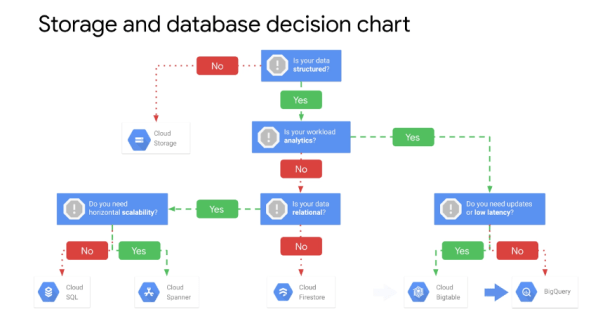
Cloud Storage 🗄 (Object Storage 🗄) – It allows worldwide🌎 storage 🗄 and retrieval of any amount of data at any Time ⏳.
- Scalable ⚖️ to exabytes
- Time⏳ to first byte in milliseconds
- Very high availability across all storage 🗄 classes
- Single API across storage 🗄 classes
Use Cases:
- Website content
- Storing data for archiving and disaster recovery
- Distributing large data objects to users via direct download
Cloud Storage 🗄 has four storage 🗄 classes:
- Regional storage 🗄 enables you to store data at lower cost with the tradeoff of data being stored in a specific regional location.
- Multi regional storage 🗄 is geo redundant, Cloud Storage 🗄 stores, your data redundantly and at least two geographic locations separated by at least 100 miles within the multi-regional location of the bucket 🗑.
- Near line storage 🗄 is a low cost, highly durable storage 🗄 service for storing infrequently accessed data.
- Cold Line storage 🗄 is a very low cost, highly durable storage 🗄 service for data, archival, online backup and disaster recovery. Data is available within milliseconds, not hours or days.


Buckets🗑
- Naming requirements
- Cannot be nested
- Regional bucket 🗑 & Multi-Regional cannot be changed
- Objects can be moved from bucket 🗑 to bucket 🗑
Objects
- Inherit storage 🗄 class of bucket 🗑 when created
- No minimum size: unlimited storage 🗄
Access
- gsutil command
- (RESTful) JSON API or XML API
Access control lists (ACLs)
For some applications, it is easier and more efficient to grant limited Time ⏳ access tokens that can be used by any user instead of using account-based authentication for controlling resource access.
Signed URLs
“Valet Key” access to buckets 🗑 and objective via ticket:
- Ticket is a cryptographically signed URL
- Time-limited
- Operations specified in ticket: HTTP GET, PUT DELETE (not POST)
- Any user with URL can invoke permitted operations
Cloud Storage 🗄 Features
- Customer-supplied encryption key (CSEK)
- Use your own key instead of Google-managed keys 🔑
- Object Lifecycle 🔄Management
- Automatically delete or archive objects
- Object Versioning
- Maintain multiple versions of objects
- Objects are immutable
- Object Versioning:
- Maintain a history of modification of objects
- List archived versions of an object, restore an object to an older state, or delete a version
- Maintain multiple versions of objects
- Directory synchronization ↔️
- Synchronizes a VM directory with a bucket 🗑
- Object change notification
- Data import
- Strong 💪 consistency
Object Lifecycle 🔄 Management policies specify actions to be performed on objects that meet certain rules
- Examples:
- Downgrade storage 🗄 class on objects older than a year.
- Delete objects created before a specific date.
- Keep only the 3 most recent versions of an object
- Object inspection occurs in asynchronous batches
- Changes can take 24 hours to apply
Object change notification can be used to notify an application when an object is updated or added to a bucket 🗑
Recommended: Cloud Pub/Sub Notifications for Cloud Storage 🗄
Data import services
- Transfer Appliance: Rack, capture and then ship your data to GCP
- Storage Transfer Service: Import online data (another bucket 🗑, S3 bucket 🗑, Web Service)
- Offline Media Import: Third-party provider uploads the data from physical media
Cloud Storage 🗄 provides Strong 💪 global consistency
Cloud SQL is a fully managed database 🛢 service (MySQL or PostgreSQL)
- Patches and updates automatically applied
- You administer MySQL users
- Cloud SQL supports many clients
- gCloud sql
- App Engine, Workspace scripts
- Applications and tools 🛠
- SQL Workbench Toad
- External applications using standard MySQL drivers
- Cloud SQL delivers high performance and scalability ⚖️ with up to 30 TBs of storage 🗄 capacity, 40,000 IOPS and 416 GB of RAM
- Replica service that can replicate data between multiple zones
- Cloud SQL also provides automated and on demand backups.
- Cloud SQL scales ⚖️ up (require a restart)
- Cloud SQL scales ⚖️ out using read replicas.
Cloud Spanner is a service built for the Cloud☁️ specifically to combine the benefits of relational database 🛢 structure with non-relational horizontal scale⚖️
Data replication is synchronized across zones using Google’s global fiber network
- Scale⚖️ to petabytes
- Strong 💪 consistency
- High Availability
- Used for financial and inventory applications
- Monthly uptime ⏳
- Multi-regional:99.999%
- Regional: 99.99%
Cloud Firestore is a fast, fully managed serverless Cloud☁️ native NoSQL document database 🛢 that simplifies storing, syncing ↔️ and querying data for your Mobile 📱 Web and ioT applications a global scale⚖️.
- Simplifies storing, syncing ↔️, and querying data
- Mobile📱, web🕸, and IoT apps at global scale⚖️
- Live synchronization ↔️ and offline support
- Security🔒 features
- ACID transactions
- Multi-region replication
- Powerful query engine
Datastore mode (new server projects):
- Compatible with Datastore applications
- Strong 💪 consistency
- No entity group limits
Native mode (new Mobile 📱 and web🕸 apps):
- Strongly 💪 consistent storage 🗄 layer
- Collection and document 📄 data model
- Real-time updates
- Mobile📱 and Web🕸 Client libraries📚
Cloud Bigtable (Wide Column DB) is a fully managed, no SQL database 🛢 with petabytes scale⚖️ and very low latency.
- Petabyte-scale⚖️
- Consistent sub-10ms latency
- Seamless scalability⚖️ for throughput
- Learns and adjusts to access patterns
- Ideal for Ad Tech, FinTech, and IoT
- Storage 🗄 engine for ML applications
- Easy integration with open source big data tools 🛠
Cloud MemoryStore is a fully managed Redis Service built on scalable ⚖️, Secure🔒 and highly available infrastructure managed by Google Applications.
- In-memory data store service
- Focus on building great apps
- High availability, failover, patching and Monitoring 🎛
- Sub-millisecond latency
- Instances up to 300 GB
- Network throughput of 12 Gbps
- “Easy Lift-and-Shift”
Resource Management lets you hierarchically manage resources
- Resources can be categorized by Project, Folder📂, and Organization
- Resources are global🌎, regional, or zonal
- Resource belongs to only one project
- Resources inherent policies from their parents
- Resource consumption is measured in quantities like rate of use or Time⏳
- Policies contain a set of roles, and members and policies are set on
- Policy is less restrictive; it overrides the more restrictive resource policy.
- Organization node is root node for GCP resources
- Organization contains all billing accounts.
- Project accumulates the consumption of all its resources
- Track resource and quota usage
- Enable billing
- Manage permissions and credentials
- Enable services and APIs
- Project use 3 identifying attributes
- Project Name
- Project Number (unique)
- Project ID (unique)
Quotas
All resources are subject to project quotas or limits
Examples:
- Total resources you can create per project: 5 VPC networks/project
- Rate you make API requests in a project: 5 admin actions/second (Cloud☁️ Spanner)
- Total resources you can create per region: 24 CPUs region/project
Increase: Quotas page in GCP Console or a support ticket
Your use of GCP expands over time⏳, your quotas may increase accordingly.
Project Quotas:
- Prevent runaway consumption in case of an error or malicious attack
- Prevent billing spikes or surprises
- Forces sizing consideration and periodic review
Labels and names
Labels 🏷 are a utility for organizing GCP resources
- Attached to resources: VM, disk, snapshot, image
- GCP Console, gCloud, or API
- Example uses of labels 🏷 :
- Inventory
- Filter resources
- In scripts
- Help analyze costs
- Run bulk operations
Comparing labels and tags
- Labels 🏷 are a way to organize resources across GCP
- Disks, image, snapshots
- User-defined strings.in key-value format
- Propagated through billing
- Tags are applied to instances only
- User-defined strings
- Tags are primarily used for networking (applying firewall rules🔥)
Billing
- Set a budget lets you track how you spend
- Set a budget alerts 🔔send alerts 🔔and emails📧to Billing Admin
- Use Cloud☁️ pubsub notifications to programmatically receive spend updates about this budget.
- Optimize your GCP spend by using labels
- Visualize GCP spend with Data Studio
Its recommended labeling all your resources and exporting billing data to Big Query to Analyze spend.
“Every single day. Every word you say… Every game you play. Every night you stay. I’ll be watching you”
Resource Monitoring 🎛
Stackdriver
- Integrated Monitoring 🎛, Logging, Error Reporting, Tracing and Debugging
- Manages across platforms
- GCP and AWS
- Dynamic discovery of GCP with smart defaults
- Open-source agents and integrations
- Access to powerful data and analytics tools 🛠
- Collaboration with third-party software
Monitoring 🎛 is important to Google because it is at the base of Site Reliability Engineering (SRE).
- Dynamic config and intelligent defaults
- Platform, system, and application metrics
- Ingests data: Metrics, events, metadata
- Generates insights through dashboards, charts, alerts
- Uptime /health checks⛑
- Dashboards
- Alerts 🔔
Workspace is the root entity that hold Monitoring 🎛 and configuration information
- “Single pane of glass 🍸”
- Determine your Monitoring 🎛 needs up front
- Consider using separate Workspace for data and control isolation
To access an AWS account, you must configure a project in GCP to hold the AWS connector because workspaces can monitor all of your GCP projects in a single place.
Stack Driver Monitoring 🎛 allows you to create custom dashboards that contain charts 📊of the metrics that you want a monitor.
Uptime checks test the availability of your public services
Stock driver Monitoring 🎛 can access some metrics without the Monitoring 🎛 agent, including CPU utilization, some disk traffic 🚥metrics, network traffic and up Time⏳ information.
Stack Driver Logging provides logging, error, reporting, tracing and debugging.
- Platform, systems, and application logs
- API to write to logs
- 30-day retention
- Log search/view/filter
- Log-based metrics
- Monitoring 🎛 alerts 🔔can be set on log events
- Data can be exported to Cloud Storage 🗄, BigQuery, and Cloud Pub/Sub
- Analyze logs in BigQuery and visualize in Data Studio
Stack driver Error Reporting counts, analyzes and aggravates the errors in your running Cloud☁️ services
- Error notifications
- Error dashboard
- Go, Java☕️, .NET, Node.js, PHP, Python 🐍, and Ruby♦️
Stack Driver Tracing is a distributed tracing system that collects Layton. See data from your applications and displays it in the GCP console.
- Displays data in near real-time ⏳
- Latency reporting
- Per-URL latency sampling
- Collects latency data
- App Engine
- Google HTTP(S) load balancers🏋️♀️
- Applications instrumented with the Stackdriver Trace SDKs
Debugging
- Inspect an application without stopping 🛑 it or slowing it down significantly
- Debug snapshots:
- Capture call stack and local variables of a running application
- Debug logpoints:
- Inject logging into a service without stopping 🛑 it
- Java☕️, Python🐍, Go, Node.js and Ruby♦️
“At last the sun☀️ is shining, the clouds☁️ of blue roll by”
We will continue next week with Part III of this series….
Thanks –
–MCS